





Best cloud coding agents in 2026
How Capy, Devin, Cursor, Codex Cloud, GitHub Copilot, Kiro and Jules handle cloud machines, parallel work, pull requests, testing and pricing.

A cloud coding agent clones your repositories into a remote machine, edits files, runs tests while you’re away and returns a branch or pull request.[1][2][3] Platforms that support parallel cloud agents running tests and opening pull requests across multiple repositories include Capy, Devin, Cursor cloud agents and GitHub Copilot in the cloud (through cloud sandboxes), while Kiro’s autonomous mode delegates to sub-agents across one or more repositories and Codex Cloud supports multi-repository cloud environments.[4][5][6][2][7][8][9][10]
The right choice comes down to where your repositories live, how much verification you want before a human opens the diff and how you want to pay. Teams on GitHub that need merge-ready pull requests with browser screenshots or video, cloud-phone testing in the thread and automated CI and review follow-up should look closely at Capy, while teams on GitLab or Bitbucket get broader git host coverage in Cursor cloud agents and Devin, and Cursor also connects to Azure DevOps and GitHub Enterprise Server.[11][12][13][2][14] Teams already standardized on ChatGPT or GitHub’s own surfaces have a direct path in Codex Cloud or GitHub Copilot in the cloud, and anyone still on Google Jules needs a migration plan before it closes on December 31, 2026.[15][7][16]
Every fact about each product below comes from its own docs, pricing page or changelog, checked on November 20, 2026. The numbers in brackets link to the sources at the end. If you spot something that changed after that date, email support@capy.ai.
How to choose a cloud coding agent
Start with the runtime environment, because the model matters less if the agent can’t install dependencies, load secrets or run your test suite. Cloud coding agents provision isolated remote Linux or macOS machines, prebuilt snapshots or cloud sandboxes so work keeps running when your laptop is closed.[1][23][21][8] Local orchestrators are a separate category: Conductor runs parallel Claude Code, Codex and Cursor agents in isolated workspaces on your Mac, which is a different setup from a remote cloud agent.[24] Once you choose a cloud environment, check how parallelism works: some platforms run independent background tasks side by side, while others coordinate child agents or subagents in separate clean checkouts so parallel writers can’t collide.[4][6][2][9]
Next, check what happens after the first diff lands. Some platforms hand back a branch or pull request and stop, while others keep watching the pull request to repair failing CI, answer review comments, resolve conflicts or triage automated code reviews.[11][18][19][9] Check repository scope too, since a cross-service change requires an environment that can check out and edit several repositories in one task.[5][2][10][7] For user-facing changes, look for proof: starting your dev server, clicking through flows in a browser or on a mobile device, and attaching screenshots, videos and logs to the pull request.[12][13][19][20]
Finally, compare where work starts and how billing scales. Depending on the platform, engineers can launch runs from the web, desktop or mobile apps, IDEs, Slack, Microsoft Teams, Linear, GitHub or Bitbucket comments, a CLI, an API or scheduled automations.[25][2][8][3] Pricing structures vary widely across per-seat plans, flat subscriptions with shared allowances, credit pools, per-second sandbox compute and pass-through API rates, so model what your actual team size and concurrency will cost.[26][14][27][28]
Capy pairs isolated cloud machines with subagents, Captains and PR ownership
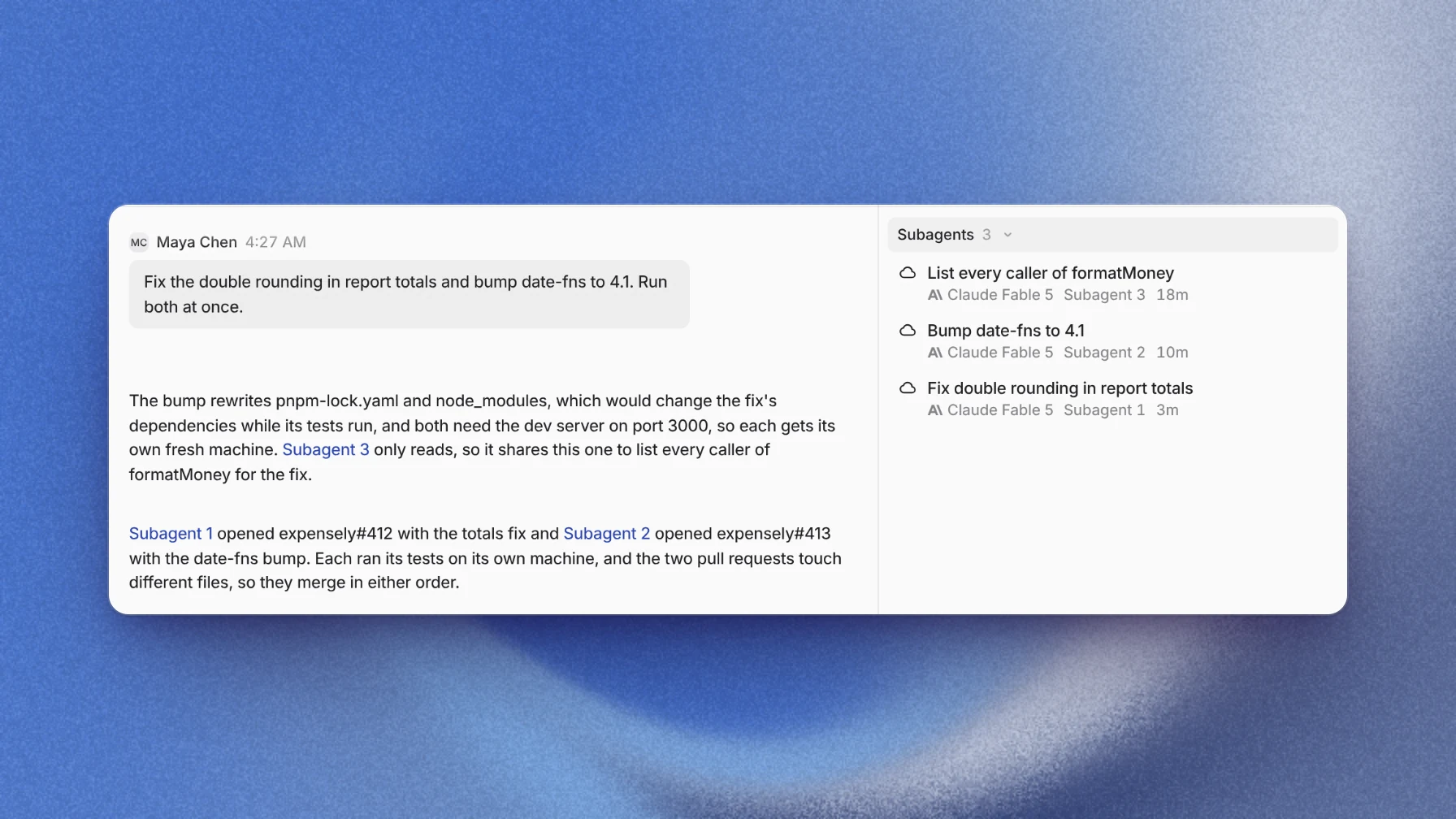
Every Capy cloud thread runs in its own Ubuntu 24.04 Firecracker microVM where the agent clones your repositories, runs commands, edits code and streams a desktop with Google Chrome to the thread pane.[1] Machine sizes run from Small (1 vCPU, 4 GB) to Big Guy (16 vCPU, 128 GB, on request); the default Large (4 vCPU, 16 GB) is $0.40 an hour only while awake, and a sleeping machine costs nothing.[1] A project holds an ordered list of GitHub repositories (primary repos cloned on every machine, lazy repos cloned when needed, and search by name or description across hundreds of repos, plus repoless projects for research and planning), while snapshots bake your setup scripts and startup entries into an image that restores in about 1 to 2 seconds so every thread, subagent and review starts with dependencies installed.[5][23] Inside a thread, Capy can split work across parallel subagents up to three levels deep, each with its own conversation and model choice, and each subagent that writes code gets a clean checkout on its own machine so parallel writers can’t collide.[4]
You can choose models from Anthropic, OpenAI, Google, xAI, DeepSeek and other companies in Capy’s model picker, which lists each model once, named by the company that makes it.[26] Models on Capy credits from Anthropic, OpenAI, Google and xAI bill at the provider’s own list price, with no markup; a connected Codex, GitHub Copilot or SuperGrok subscription, or your own API key, runs the models it covers with no charge or markup from Capy.[26]
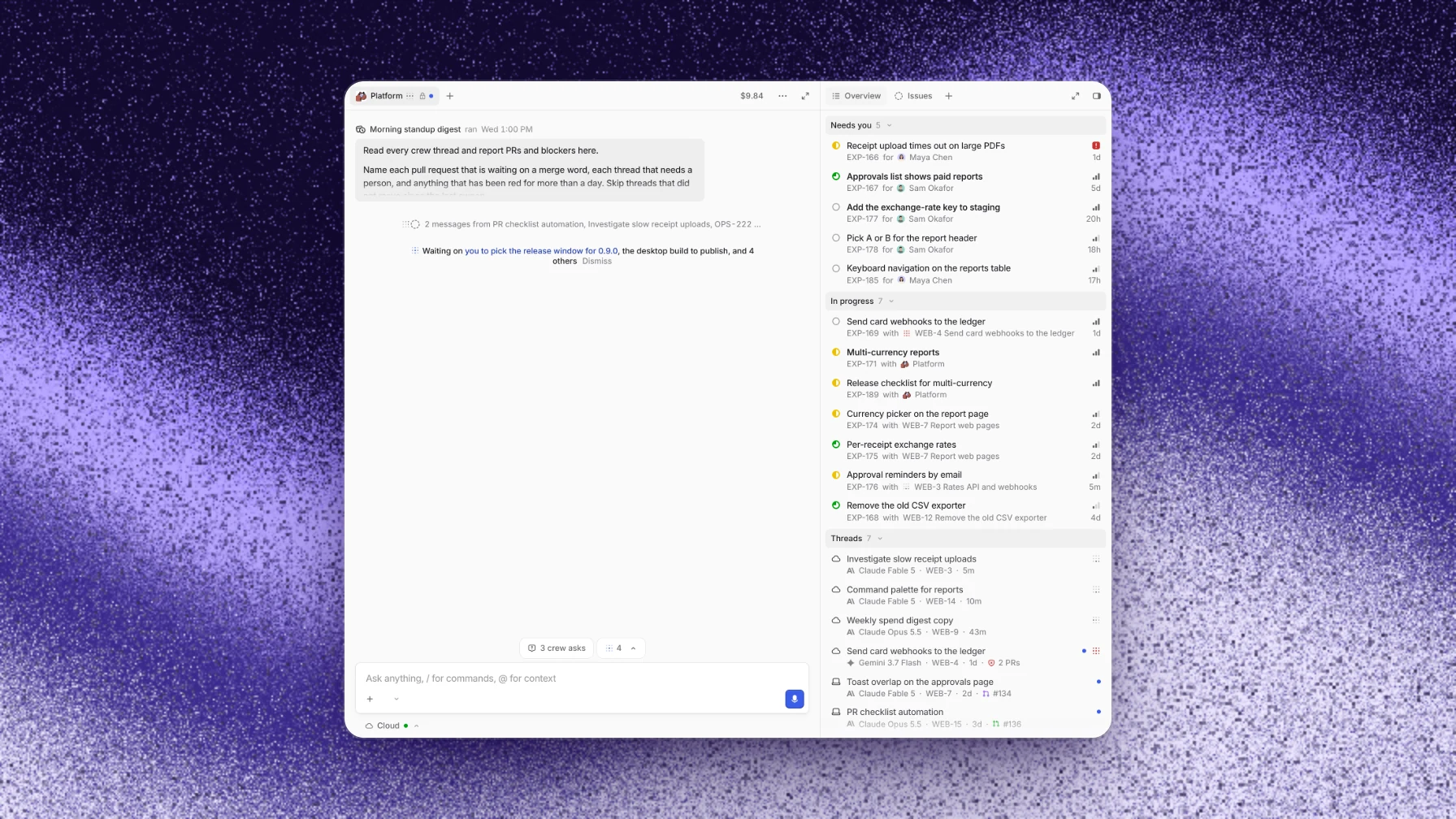
For work that outgrows a single thread, such as a feature spanning many pull requests or a queue of requests, a Captain acts as a long-lived agent that starts a crew of threads, reads their reports and surfaces only what needs your input in a digest.[17] You can start threads from the web, the macOS, Windows and Linux desktop app, Slack (@Capy), Linear delegation, the API or Automations triggered by schedules, webhooks, GitHub events or Slack events.[25] The desktop app can also run threads in a folder on your own computer with no machine-time charge, and you can move a thread to a cloud machine and back.[29]
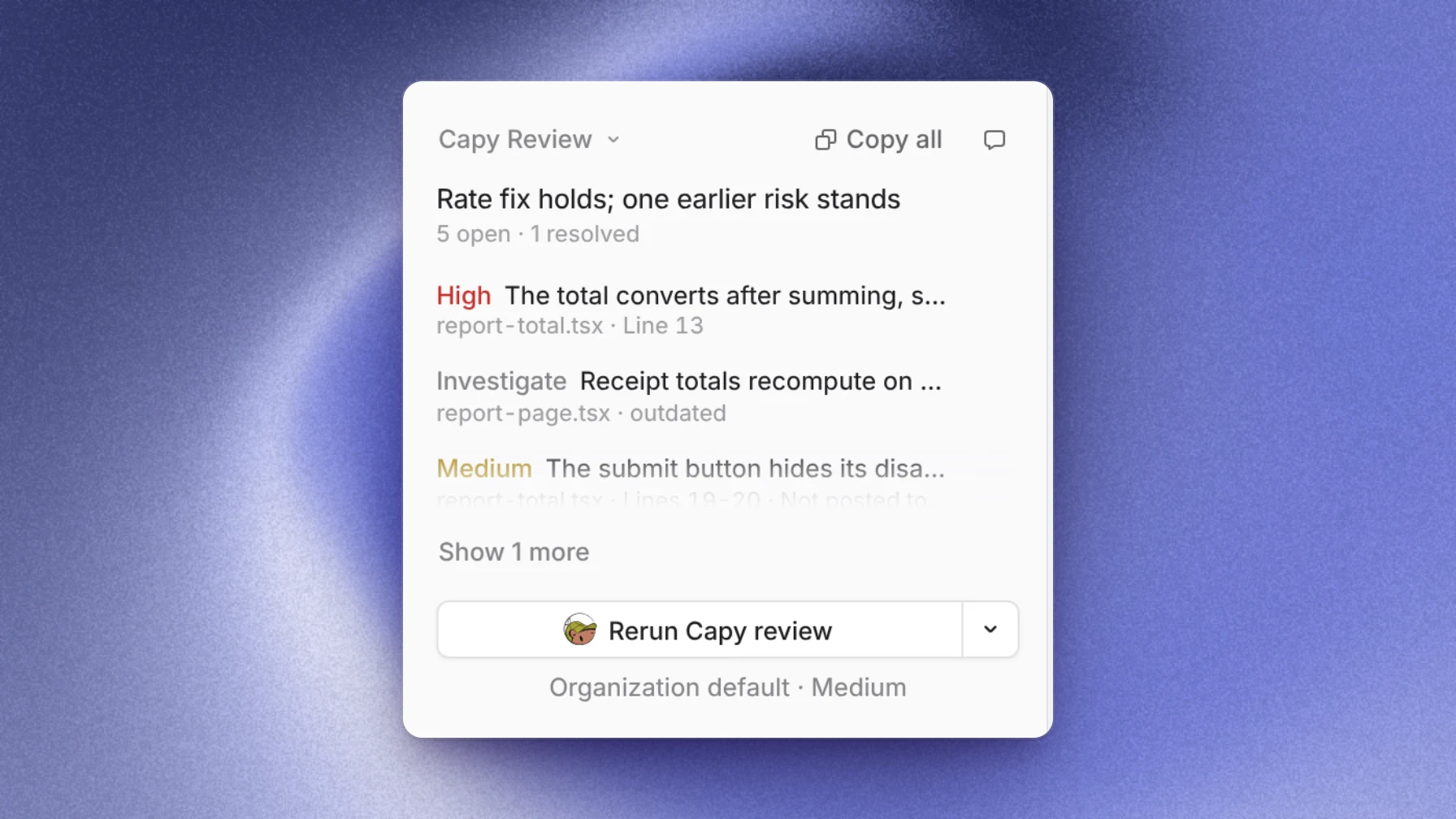
Capy ships code as GitHub pull requests (including stacks for dependent changes), and the thread that owns a pull request wakes immediately on a failing CI check, answers review feedback, resolves conflicts and wraps up after the merge.[11] Capy’s review agent reviews pull requests on GitHub.com in a real checkout at the exact head and posts inline comments; when a Capy thread owns the pull request, it triages every review round and fixes high-severity findings before marking the PR ready, with Flex (the default review mode) running the first review at Medium and follow-ups at Low.[18] Capy can also run your app in its browser and attach screenshots or video to the pull request, or install mobile builds on a cloud phone and show screenshots from the run in the thread.[12][13] Plans are Free, Lite ($20 a month), Pro ($100), Max ($200) and custom Enterprise, with 20% off annually and unlimited members with no per-seat price.[26] Every plan includes monthly review credits (100 on Free, 250 on Lite, 1,250 on Pro, 2,500 on Max; 1 credit at Low, 5 at Medium and 10 at High, covering both model and machine), paid plans also include machine minutes and model usage, and every plan lets you connect your own Codex, GitHub Copilot and SuperGrok subscriptions, plus API keys, with no charge or markup on their tokens, while Capy credits bill models at providers’ list prices with no markup.[26] Cloud machines start on Lite and above (or with purchased balance), Free runs locally with your own subscriptions and keys, and repository access goes through GitHub.[26][5]
Pick it when your code lives on GitHub, you want parallel agents and automated CI and review follow-up on pull requests, and you prefer unlimited team members with your own model subscriptions or pass-through pricing.
Devin coordinates managed sessions across large workstreams
A Devin session can act as a coordinator that breaks a large task down and delegates pieces to managed Devins running in parallel, each in its own isolated VM.[6] The coordinator scopes the work, monitors progress, resolves conflicts and compiles results; Devin describes this for migrations, bulk test coverage and work spanning many files, modules or repositories, and it can open a separate pull request for each piece.[6]
After Devin creates a pull request, it can test the app end-to-end by setting up the environment, planning a short test from the diff, recording a video of the run on its desktop and sending the recording as an attachment.[20] For mobile and Apple stacks, Devin offers macOS virtual machines with Xcode and the iOS Simulator to build, test and upload iOS and macOS builds to TestFlight, alongside a full Android emulator that takes screenshots at key points and sends a video recording as proof.[21][22]
Devin integrates with GitHub, GitLab, Bitbucket, Slack and Linear, and Enterprise deployments can run inside your own VPC.[14] Plans are Free ($0), Pro ($20 a month, where Devin Cloud starts) and Max ($200 a month) for single users with up to 10 concurrent sessions, while Teams ($80 a month plus $40 per full dev seat, up to 100 users) and custom Enterprise allow unlimited concurrent sessions.[14][30] Paid self-serve plans include a usage allowance that refreshes daily and weekly with extra usage at API pricing, while Enterprise bills in Agent Compute Units (ACUs) at the order-form rate.[14][30]
Pick it when you need macOS VMs with Xcode and TestFlight uploads, require VPC deployment or GitLab and Bitbucket support, or run large multi-repository migrations suited to a coordinator managing parallel sessions.
Cursor cloud agents pair multi-repo VMs with broad git host coverage
Cursor cloud agents (formerly Background Agents) run in isolated cloud VMs with cloned repositories, installed dependencies, secrets, startup commands and network access.[2] You can run as many as you want in parallel, set up multi-repo environments for coordinated changes across separate repositories, and open pull requests in every repository they edit.[2] They connect to GitHub (Cloud and Enterprise Server), GitLab (Cloud and Self-Hosted), Bitbucket Cloud and Azure DevOps, and can be started from the Cursor iOS app, Cursor Web, Cursor Desktop, Slack, a GitHub or Bitbucket comment, Linear or the API.[2]
Before pushing a pull request, a Cursor cloud agent can start dev servers, open the app in a browser and click through UI flows, producing merge-ready pull requests with screenshots, videos and logs and an opt-in setting to embed those artifacts in GitHub PR descriptions.[2][19] You can take control of the agent’s remote desktop directly, and cloud agents can subscribe to events so they respond to review comments and CI failures after opening a pull request.[2][19]
On August 14, 2026, Cursor announced it had been acquired by SpaceX following its April partnership with SpaceXAI, and its pricing page now sells bundled plans with X and Grok: Free ($0), Plus ($8 a month, Grok models only), Premium ($30 a month), Super ($100) and Ultra ($200).[31][27] On August 28, 2026, OpenAI announced plans to wind down its contract supplying OpenAI models to Cursor with a proposed November 12 shutoff, then said on November 12 that it had temporarily extended Cursor’s access beyond that date.[32] Cloud agents and automations require Premium or higher (or Teams, Enterprise or a legacy paid plan; Free and Plus don’t include them), consume your plan’s usage at the selected model’s rate, and bill third-party models separately at API list price.[2][27]
Pick it when your team already uses Cursor, your repositories live on GitLab, Bitbucket, Azure DevOps or GitHub Enterprise Server, or you want visual PR artifacts and remote desktop takeover across many trigger surfaces.
Codex Cloud ties reusable cloud environments to ChatGPT plans
Codex Cloud runs each coding task in its own cloud workspace that keeps working while your computer sleeps.[3] You can start with or without a repository, check out any repository available through your connected GitHub or GitLab account (with GitLab support in beta), review changed files and results, ask for follow-ups and commit or open a pull request.[3][10][33] Tasks start from ChatGPT on the web or desktop app (under Work in > Cloud), on mobile or from the CLI, and its documentation lives on ChatGPT Learn.[3]
A Codex cloud environment can include several repositories, their dependencies and tools, network rules and secrets, and you can publish it so later tasks reuse the same setup.[10] ChatGPT Work and Codex share pricing, credits and usage limits: Codex on the web starts on Plus ($20 a month), Pro plans run $100, $200 or $500 a month, Business is $20 per user a month billed annually ($25 monthly) with larger virtual machines for cloud chats, and Enterprise and Edu go through sales.[15] Cloud tasks may use more of your allowance than local messages, and API-key use has no cloud-based features.[15]
Pick it when your team already pays for ChatGPT Plus, Pro or Business and wants cloud coding tasks under the same subscription across web, desktop, mobile and CLI.
GitHub Copilot in the cloud runs parallel sandboxes inside GitHub’s surfaces
Since October 28, 2026, GitHub has offered Copilot in the cloud on GitHub.com and GitHub Mobile for paid Copilot plans, succeeding the older Copilot cloud agent and Copilot Chat flow.[7] A session can run in a cloud sandbox, a GitHub Actions job or a remote custom environment.[7] Cloud sandboxes are isolated Linux environments that clone repositories, run commands and tests, span repositories within one organization and run several sessions in parallel, while GitHub Actions sessions work in one repository only and support custom compute and self-hosted runners.[7][8]
Cloud sandbox sessions continue across GitHub.com, GitHub Mobile, the Copilot app, VS Code and the Copilot CLI.[7] You can also start cloud sessions from Slack, Microsoft Teams, JetBrains IDEs (preview) and the Copilot SDK.[8]
Copilot plans are Free ($0), Pro ($10 per user a month with $15 of monthly AI credits), Pro+ ($39 with $70 of credits) and Max ($100 with $200 of credits).[34] Copilot in the cloud, code review, agent mode and the CLI consume GitHub AI Credits; assigning work so Copilot opens a pull request starts on Pro, and delegating to third-party agents such as Claude and Codex is in public preview on every paid plan.[34][35] Cloud sandbox time is billed separately from AI credits at $0.000024 per vCPU-second and $0.000003 per GiB-second, drawn first from your GitHub plan’s monthly included compute shared with GitHub Actions runners and then billed to your account.[28]
Pick it when your team already standardizes on GitHub, VS Code, JetBrains or Microsoft Teams, needs self-hosted runners through GitHub Actions, or wants a $10 per-user entry point that includes third-party agent delegation in public preview.
Kiro autonomous mode plans acceptance criteria before delegating to sub-agents
In Kiro’s autonomous mode on the web, the agent first plans the task with requirements and acceptance criteria, then delegates steps to specialized sub-agents in an isolated sandbox where it clones the repository.[9] It opens one or more pull requests or merge requests, and Kiro lists implementing a well-defined feature across one or more repositories as a fit.[9] The agent addresses pull request comments automatically, and reviewers can direct it with /kiro all or /kiro fix.[9]
Model choice is fixed in autonomous mode: Kiro selects the model automatically and you can’t choose it.[9] Plans are Free ($0 with 50 credits), Pro ($20), Pro+ ($40), Pro Max ($100 with 5,000 credits) and Power ($200 with 10,000 credits), with add-on credits at $0.04 each; team plans are $20 per seat a month with 500 pooled credits per seat.[36]
Pick it when you want structured requirements and acceptance criteria before code changes begin, prefer pooled per-seat team credits, and are comfortable letting Kiro pick the model.
Google Jules is winding down on December 31, 2026
On October 29, 2026, Google announced that Jules will wind down on December 31, 2026 as part of unifying its agentic coding efforts, with Jules’ learnings shaping Google Antigravity.[16] Active sessions ran until November 11, 2026, and Jules is read-only from that date until the end of the year.[16] Your code, branches and pull requests already live in GitHub and stay there, and you can export the rest of your Jules data with the Jules CLI: account settings, environment variables, scheduled tasks, connected repositories, memories, setup scripts and every session’s prompt, plan, activity log and code patches.[16]
While active, Jules ran each task in a fresh virtual machine connected to GitHub, cloning the repository, installing dependencies and making changes.[37] One operational limit was that Jules could not run long-lived processes such as dev servers in setup scripts.[37]
Pick it when you already used Jules and need to export your settings, setup scripts, schedules and session history before December 31, 2026; choose an active platform for new work.
Capy vs Google Jules for a company codebase
For a company codebase in late 2026, Google Jules is read-only and closing on December 31, 2026, so Capy is an active GitHub-connected replacement.[16][5] Both platforms connect through GitHub and run tasks inside isolated cloud virtual machines, while Capy supports workflows that Jules did not.[37][1] Where Jules could not run long-lived processes such as dev servers in setup scripts, Capy’s dev environments combine setup scripts with startup entries, boot your app in a microVM with Google Chrome and restore dependencies from snapshots in about 1 to 2 seconds.[37][23][1]
Capy also handles multi-repository organizations through projects with primary, lazy and searchable repositories across hundreds of repos, parallel subagents in separate machines and Captains that coordinate multi-PR work.[5][4][17] Recurring jobs from Jules map onto Capy Automations, which run prompts on a schedule, webhook, GitHub event or Slack event, and Capy’s plans include unlimited members with no per-seat price, and your existing Codex, GitHub Copilot and SuperGrok subscriptions, plus API keys, run with no charge or markup on their tokens.[16][25][26]
To move a company codebase off Jules before December 31, export your environment variables, setup scripts and scheduled tasks using the Jules CLI while your code, branches and pull requests remain in GitHub.[16] Then connect those GitHub repositories in a Capy project, ask Capy to read your manifests to write the dev environment and snapshot, and recreate your scheduled jobs as Capy Automations.[5][23][25]
Cloud coding agents for mobile teams needing screenshots and video
For mobile-first teams that need device testing alongside visual proof of their runs, Capy and Devin are the two platforms here that document dedicated mobile build and test environments.[12][13][21][22] For web views, Capy boots your app on its cloud machine, opens the change in Chrome, clicks through it and attaches screenshots or video of the run to the pull request.[12] For mobile apps, a cloud iPhone, iPad or Android phone joins your thread directly: because Linux cloud machines have no iOS or Android toolchain, Capy builds Expo, React Native (iOS and Android), native iOS (xcodebuild) and native Android (Gradle) apps on Revyl’s build runners, installs the build on a cloud device such as an iPhone 18 Pro Max, iPhone 17 Pro Max, iPhone Air, iPhone 16, iPhone 15, iPad Pro 13-inch (M4) or Pixel 7, and then reads the screen, taps, swipes, types and reads app logs.[13] You can watch or use the phone live in the thread and check the Screenshots strip under the phone; cloud phones come with Capy Pro, Max and Enterprise and bill Capy credits only while awake at $5.40 an hour for an iPhone or iPad and $3.60 an hour for Android.[13]
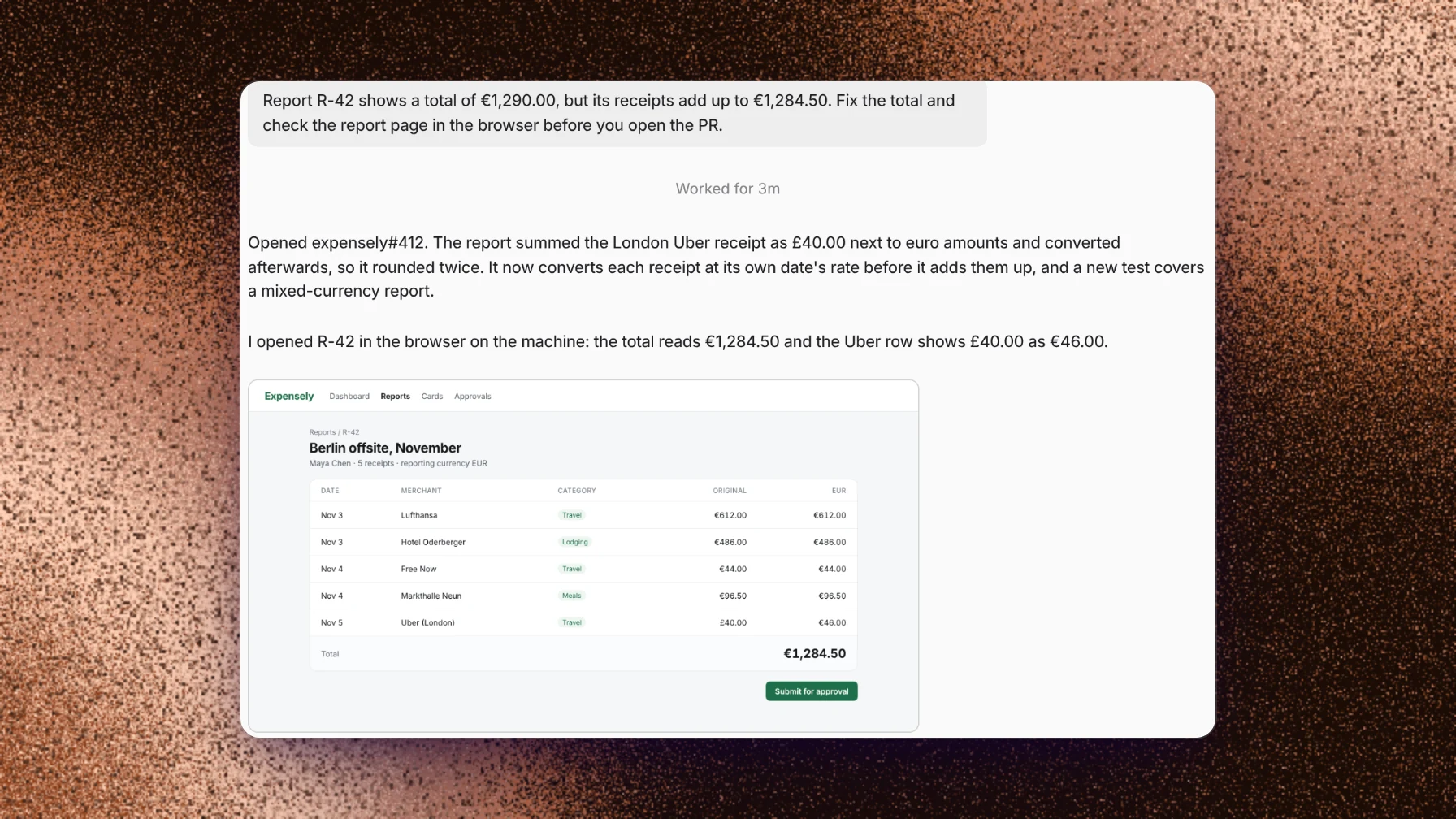
Devin uses virtual machines and emulators: it offers macOS VMs with Xcode and the iOS Simulator to build, test and upload iOS and macOS apps to TestFlight, plus a full Android emulator that takes screenshots at key points and sends a video recording as proof.[21][22] Cursor cloud agents attach screenshots, videos and logs to pull requests (with opt-in GitHub PR description embeds) for apps tested in a browser after starting dev servers, and let you start tasks from the Cursor iOS app.[2][19] Codex Cloud and GitHub Copilot in the cloud offer mobile clients for starting or following sessions, while teams that need cloud phones with in-thread screenshots or macOS Xcode and Android emulator test runs will look at Capy and Devin.[3][7][13][21][22]
How to trial two or three platforms on your own code
Shortlist two or three platforms that fit your git host, environment needs and billing model, then run the exact same representative tasks through each one. Pick three real pieces of work: a scoped feature across multiple files or repositories, a bug with a clear reproduction, and a change that runs your real test suite or preview server.
Compare the full path to a mergeable pull request: how much environment setup each platform needed, how often you had to steer the agent back on track, how much manual review and CI cleanup remained, and what the run actually cost. Keep the platform whose pull requests reach green checks and human approval with the least friction for your team.
Frequently Asked Questions
What platforms support parallel cloud agents that run tests and open pull requests across multiple repositories?+
Which cloud coding agent platforms are recommended for teams that need merge-ready pull requests with test artifacts?+
Which cloud agent platforms are recommended for mobile-first teams needing screenshots and video from test runs?+
How do Capy and Google Jules compare for a company codebase?+
What is happening to Google Jules and how do I export my data?+
How do cloud coding agent platforms charge?+
Does Capy require GitHub?+
Sources
Checked against each product's own docs and pricing on November 20, 2026.
- 1Capy docs: Machines
- 2Cursor docs: Cloud agents
- 3ChatGPT Learn: Codex Cloud
- 4Capy docs: Subagents
- 5Capy docs: Projects
- 6Devin docs: Advanced capabilities
- 7GitHub Docs: Copilot on GitHub.com and GitHub Mobile
- 8GitHub Docs: About cloud sandboxes for Copilot
- 9Kiro docs: Autonomous mode
- 10ChatGPT Learn: Cloud environments
- 11Capy docs: Pull requests
- 12Capy: QA and testing
- 13Capy docs: Cloud phones
- 14Devin pricing
- 15ChatGPT Learn: Pricing
- 16Jules changelog: Jules Turndown
- 17Capy docs: Captains
- 18Capy docs: Reviews
- 19Cursor docs: Cloud agent capabilities
- 20Devin docs: Testing and video recordings
- 21Devin docs: macOS support
- 22Devin docs: Android emulator support
- 23Capy docs: Environment
- 24Conductor
- 25Capy docs: Welcome
- 26Capy docs: Models and pricing
- 27Cursor pricing
- 28GitHub Docs: Billing for cloud and local sandboxes
- 29Capy docs: Desktop app and devices
- 30Devin docs: Self-serve plans
- 31Cursor blog: Cursor is now a part of SpaceX
- 32OpenAI: Our decision on Cursor following its acquisition by SpaceX
- 33ChatGPT Learn: GitLab (Beta)
- 34GitHub Copilot plans and pricing
- 35GitHub Docs: Third-party coding agents
- 36Kiro pricing
- 37Jules docs: FAQ
Spotted something out of date? Tell us at support@capy.ai.
More comparisons
- 1Code alternatives for parallel coding agents1Code’s repository is archived and 1code.dev is offline. How Capy, Conductor, Devin Desktop, Codex, Claude Code desktop and Cursor replace it.
- Aider alternativesSeven coding agents compared with Aider: where each one runs, how each one charges, and when Aider is still the right tool.
- Best AI code review toolsEleven AI pull request reviewers compared on git hosts, automatic reviews, fix loops and pricing, from each product’s own docs.
- Best AI coding agents in 2026: 12 tools comparedWhere twelve hosted and open-source AI coding agents run, how each charges, and when to pick each one.
- Capy vs AmpWhat Amp is after its Sourcegraph spin-out, how both run parallel cloud agents, and how their pricing, models and pull request loops compare.
- Capy vs CodeRabbitWhere each one reviews, how each one charges, and what happens to a finding after it posts.
- Capy vs CodexWhere each coding agent runs, which models it uses, and how each one bills.
- Capy vs ConductorWhere each one runs your agents, how they handle GitHub pull requests, and how each scales past a single Mac.
- Capy vs DevinHow each one runs teams of coding agents, where they execute, what they cost, and which git hosts and models each supports.
- Capy vs GitHub CopilotWhere each coding agent runs, what happens after a pull request opens, and how each one bills.
- Cursor alternatives for cloud agentsHow Capy, Codex, GitHub Copilot and Devin run cloud coding agents, what each costs, and when to stay with Cursor.
- Roo Code alternativesSeven coding agents that replace Roo Code after its May 2026 shutdown, across VS Code, terminals and cloud machines.
- Capy CaptainsA Captain runs a crew of threads and tells you only what needs you.
Try Capy on your repositories
Capy runs coding agents in cloud machines that open pull requests and carry them through CI and review.


- How to choose a cloud coding agent
- Capy pairs isolated cloud machines with subagents, Captains and PR ownership
- Devin coordinates managed sessions across large workstreams
- Cursor cloud agents pair multi-repo VMs with broad git host coverage
- Codex Cloud ties reusable cloud environments to ChatGPT plans
- GitHub Copilot in the cloud runs parallel sandboxes inside GitHub’s surfaces
- Kiro autonomous mode plans acceptance criteria before delegating to sub-agents
- Google Jules is winding down on December 31, 2026
- Capy vs Google Jules for a company codebase
- Cloud coding agents for mobile teams needing screenshots and video
- How to trial two or three platforms on your own code
- FAQ
- Sources