





Best AI coding agents in 2026: 12 tools compared
Where twelve hosted and open-source AI coding agents run, how each charges, and when to pick each one.


AI coding assistants in 2026 have moved from autocomplete to coding agents that read repositories, edit files, run commands and open pull requests. The twelve active tools below cover seven hosted products and five open-source coding agents, plus four tools that shut down, went read-only or changed hands this year.
Which one fits depends on where your code lives, whether you want local runs or cloud machines, and how your team bills usage. Pick an open-source agent if you want a permissive license, local models or full control over provider keys; pick an editor-centered tool if your work stays in an IDE; pick a cloud-agent platform if you want parallel threads running on hosted machines.
Every fact about each product below comes from its own docs, checked on November 20, 2026. The numbers in brackets link to the sources at the end.
Capy runs parallel cloud and local agents with no per-seat price
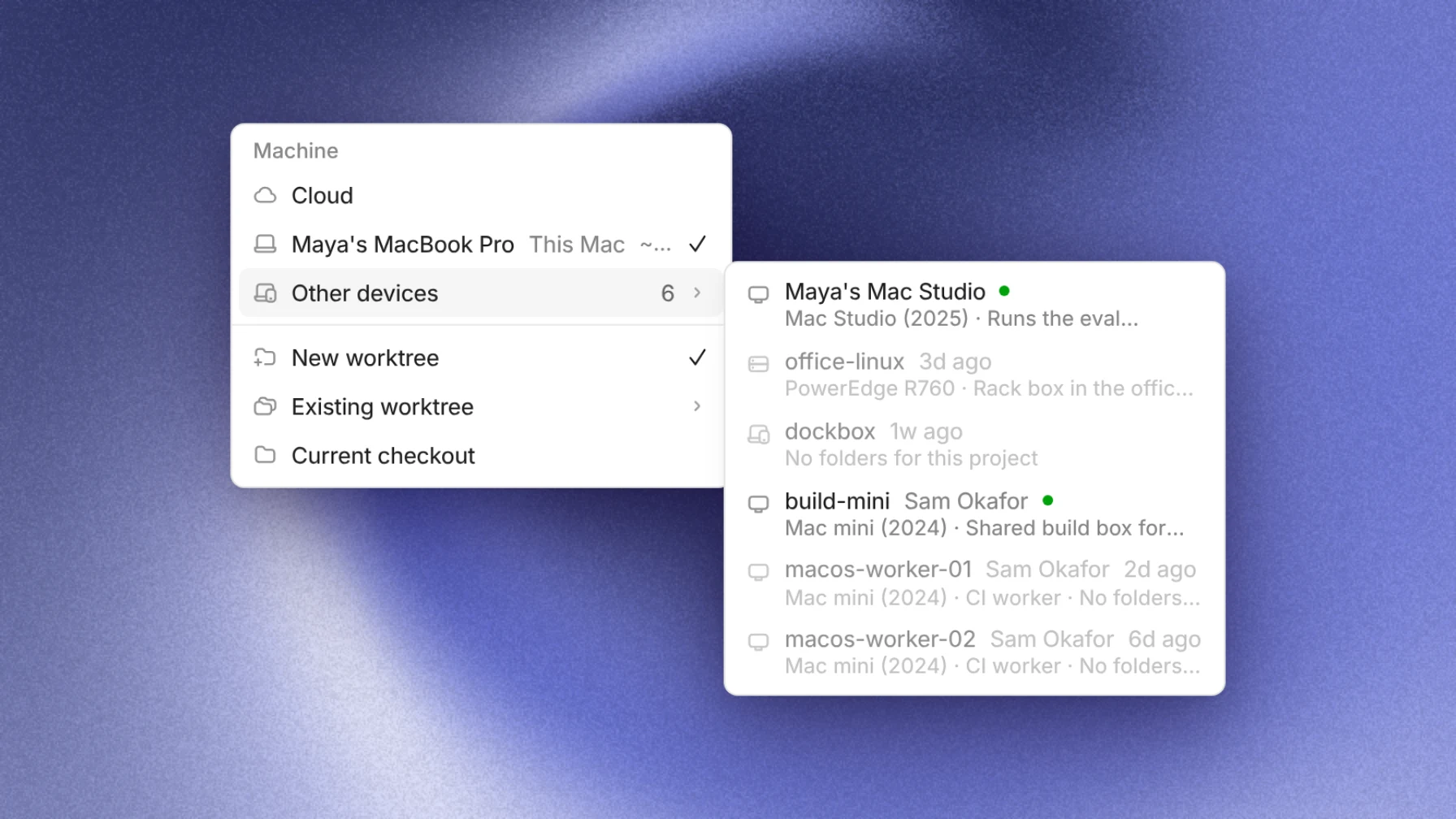
Capy is a coding-agent platform for GitHub.com repositories; GitHub Enterprise Server and other git hosts aren’t supported.[24] Each cloud thread runs in an isolated Firecracker microVM, sleeping machines cost nothing, and awake limits reach 8 Large machines on Lite, 32 on Pro and 64 on Max.[1] Through the macOS, Windows and Linux desktop app, threads also run in a local folder with your existing tools and credentials at no machine-time charge and move between your computer and the cloud.[21]
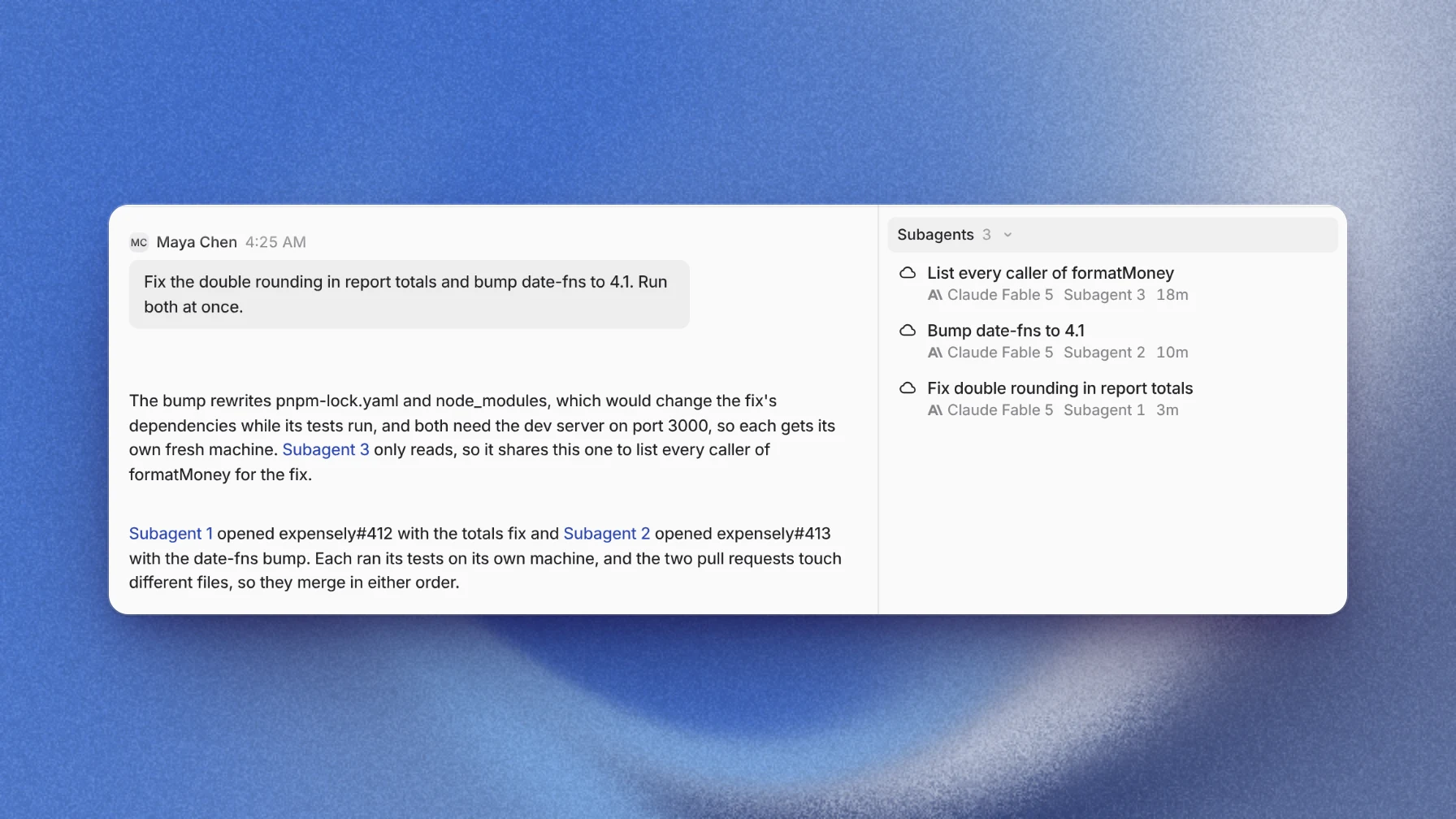
A Capy agent splits work into parallel subagents up to three levels deep, each with its own conversation, tools and model, and writers get isolated checkouts on fresh machines so they can’t collide. Subagents can open PRs.[22]
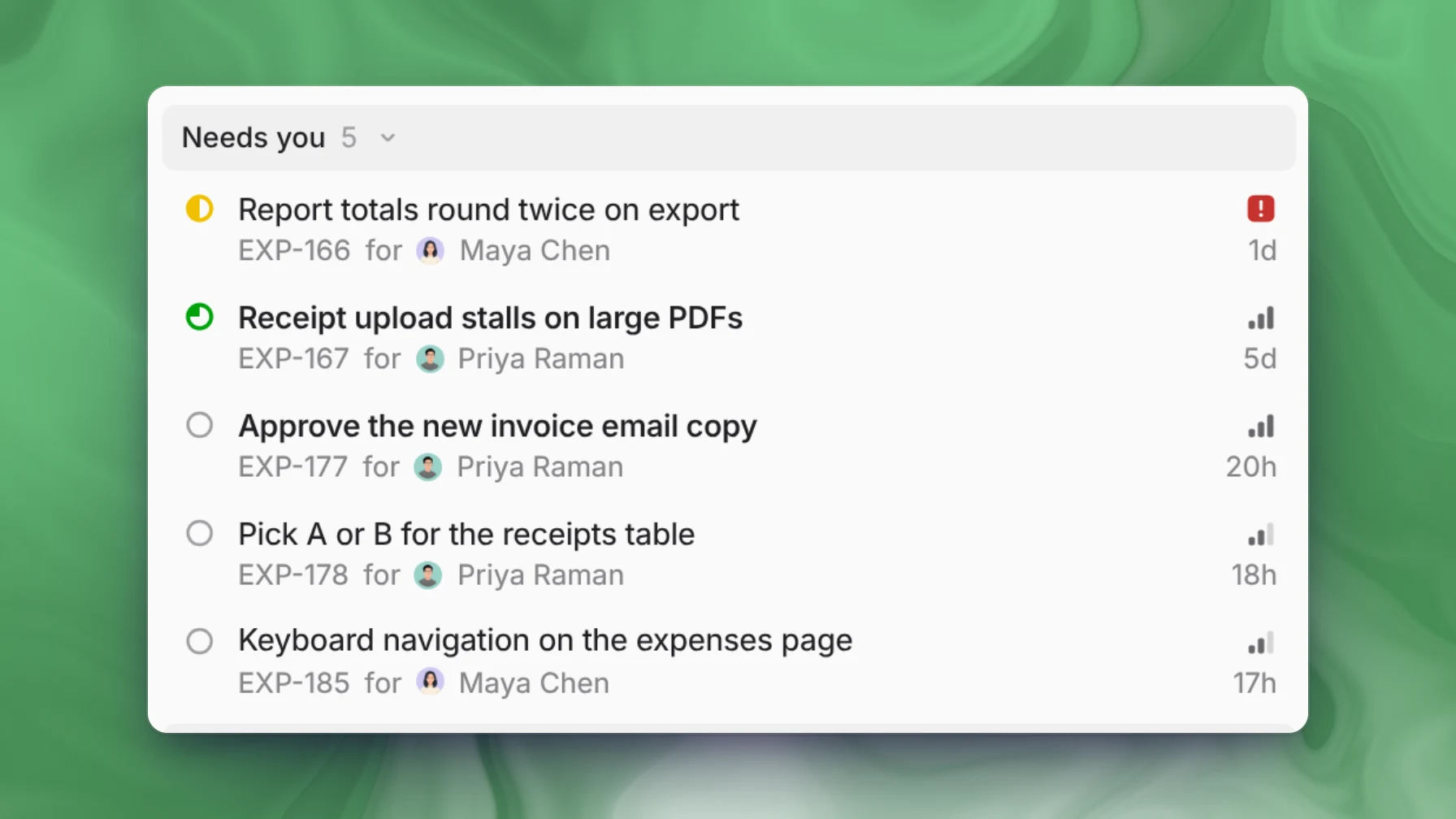
Long-lived Captains run crews of threads per area or feature, maintaining a digest of what needs you, what’s new and what’s in progress.[23] Threads start in Capy, from @Capy mentions in Slack or from delegated Linear issues, and the owning thread fixes CI, answers review feedback, resolves conflicts and wraps up after merge.[25][26][27]
Built-in PR review uses monthly review credits (Free 100, Lite 250, Pro 1,250, Max 2,500; Low 1, Medium 5, High 10).[28]
Plans are Free, Lite ($20 a month), Pro ($100), Max ($200) and custom Enterprise, 20% off annually, with unlimited members and no per-seat price.[8] Free includes 100 monthly review credits, and Lite, Pro and Max include monthly machine minutes, review credits and model usage. Threads run any model, spanning Anthropic, OpenAI, Google, xAI, Moonshot, Z.ai, DeepSeek, Qwen and others, on Capy credits at providers’ list prices or on your own subscriptions and API keys with no charge or markup, the free plan included.[8] Capy is SOC 2 Type II compliant and doesn’t train models on non-public code or chats.[29]
Pick it when your team uses GitHub.com and wants parallel cloud and local agents, Captains and built-in PR review under one shared balance with no per-seat fee.
Claude Code puts Anthropic’s agent in terminals, editors and cloud sessions
Claude Code reads your codebase, edits files, runs commands, commits, creates branches and opens pull requests.[30] It runs in the terminal, VS Code, JetBrains, a desktop app and the browser, and reads AGENTS.md in place of CLAUDE.md.[30]
Cloud sessions run on Anthropic-managed infrastructure, clone from GitHub and keep working after you close your laptop; each claude --cloud task runs in its own session so several run in parallel, with no separate VM charge.[2] Plans start at Pro for $20 a month ($17 billed annually), Max $100, Ultra $200 and Team for 2 to 150 people, and cloud sessions count toward each plan’s 5-hour and weekly usage limits (Ultra drops the 5-hour limit for verified accounts).[31][2]
Pick it when you want Anthropic’s first-party agent across terminal, IDE, desktop and GitHub cloud sessions bundled into a Claude individual or Team plan.
OpenAI Codex pairs an open-source CLI with ChatGPT-bundled cloud tasks
OpenAI Codex shares pricing and usage limits with ChatGPT.[12] Plus ($20 a month) includes Codex on the web, in the CLI, in the IDE extension and on iOS, plus automatic code review and Slack.[12] Pro plans run at $100, $200 or $500 a month, Business is $20 per user a month billed annually ($25 monthly) for two or more users, Free and Go ($8) include only GPT-6 Luna in the desktop app, and API-key use runs in the CLI, SDK or IDE extension at API prices with no cloud features.[12]
Codex Cloud runs each task in its own workspace while your computer sleeps and connects to GitHub or GitLab.[3] Codex CLI is open source (openai/codex), while the IDE extension and Codex Cloud are not open source.[32]
Pick it when you already pay for ChatGPT Plus, Pro or Business, need GitLab beside GitHub, or want an open-source CLI backed by OpenAI’s models.
Cursor runs parallel cloud agents across major git hosts under the X Subscription
SpaceX completed its acquisition of Cursor on August 14, 2026.[33] Cursor plans now come bundled with Grok and X features and are sold through X Subscription Corp: Free, Plus $8 (Grok models only), Premium $30 a month, Super $100, Ultra $200, Teams from $30 per user a month and custom Enterprise.[11] Premium and above add cloud agents and automations, Bugbot code review, and third-party models billed separately at API list price.[11]
Cursor’s cloud agents run in isolated VMs with full development environments, as many in parallel as you want, opening pull requests with screenshots, videos and logs.[4] They support GitHub (Cloud and Enterprise Server), GitLab, Bitbucket Cloud and Azure DevOps, launching from desktop, web, iOS, Slack, GitHub, Linear or the API.[4]
Pick it when your code lives on GitHub Enterprise Server, GitLab, Bitbucket Cloud or Azure DevOps, or you want cloud agents, Bugbot review and Grok under one X Subscription.
GitHub Copilot spans major editors and carries one session into the cloud
GitHub Copilot runs in VS Code, Visual Studio, JetBrains, Xcode, Neovim, Eclipse, Zed and more, plus a CLI.[10] Plans are Free ($0), Pro at $10 per user a month ($15 in GitHub AI Credits), Pro+ at $39 ($70 in credits) and Max at $100 ($200 in credits), with extra credits available to buy.[10] Paid plans let you assign work to Copilot so it opens a pull request, include PR code review, and include access to third-party agents Claude Code and Codex from Pro, with task delegation to them in preview on Pro+ and Max.[10]
Since October 28, 2026, paid plans include “Copilot in the cloud” on GitHub.com and GitHub Mobile, moving one session across web, the Copilot app, VS Code and the CLI on a cloud sandbox, or running it on a GitHub Actions runner or a remote environment.[5]
Pick it when your team uses several IDEs and wants issue-to-PR tasks, review and cloud sessions built straight into GitHub.
Devin combines cloud, desktop, CLI and review under one brand
Windsurf became Devin Desktop on June 2, 2026, bringing Devin Cloud, Devin Desktop, Devin CLI and Devin Review together under Cognition’s brand.[34] Integrations cover Slack and Teams, Linear and Jira, and GitHub, GitLab and Bitbucket.[6]
Pricing starts at Free ($0), then Pro at $20 a month (Devin Cloud agents, frontier models, extra usage at API pricing and use of your ChatGPT plan) and Max at $200.[6] Teams starts at $80 a month for up to 100 users, Enterprise offers a VPC deployment option, and usage allowances refresh daily and weekly.[6]
Pick it when you want desktop, CLI, cloud agents and review from one vendor with Jira, Teams, GitLab or Bitbucket integrations, or you need an Enterprise VPC deployment.
Amp runs each thread in a cloud orb with zero token fees on your own keys
Amp runs each thread inside an orb, a cloud machine created with your code and tools already set up so the agent keeps working after you close your laptop.[7] It is multi-model and ships apps for Mac, Windows, Linux, iPhone, iPad and Android alongside a CLI.[7]
Hobby is free with pay-as-you-go hosted orbs, Individual is $20 a month with 45,000 minutes of hosted orbs, team workspaces cost nothing extra and Enterprise is custom.[9] Self-hosted orbs are free, and you can connect your own ChatGPT or Claude subscriptions and API keys with no Amp token fees.[9]
Pick it when you want multi-model cloud orbs you can also self-host for free, desktop and mobile apps, and team workspaces with no per-seat charge.
OpenCode is an MIT-licensed agent across desktop, terminal and mobile
The next five tools are open-source coding agents; Capy is not open source. OpenCode is MIT-licensed, holds about 228,000 GitHub stars at github.com/anomalyco/opencode, and says over 22 million developers use it each month.[14][15]
It ships as a desktop app, terminal UI, mobile app and SDK, and can run several agents in parallel on one project.[15] OpenCode connects to more than 200 model providers including local models, includes free models with no account, offers the OpenCode Go subscription at $10 a month, and lets you sign in with ChatGPT Plus or Pro or GitHub Copilot.[15]
Pick it when you want an MIT-licensed coding agent across desktop, terminal and mobile with local models, free models or your existing subscriptions.
Kilo Code pairs an MIT-licensed agent with zero-markup inference and cloud runs
Kilo Code is an MIT-licensed coding agent available for VS Code, JetBrains, a CLI, a desktop app, cloud agents and Slack.[16] It connects to over 500 models with zero inference markup, works with your own keys and supports local models.[16]
Individual use is free, Teams is $15 per user a month and Enterprise is custom.[13] Inference bills at provider rates with a 5% processing fee on credit purchases, and cloud agents are billed per second at $0.60 to $1.20 an hour.[13]
Pick it when you want an open-source agent inside VS Code or JetBrains with access to over 500 models and optional per-second cloud agents.
Aider stays focused on terminal pair programming with automatic git commits
Aider is an Apache 2.0 coding agent with about 50,000 GitHub stars built for AI pair programming in the terminal.[17] It maps your whole codebase, works with almost any LLM including local models, and commits each change with a message.[17] After each change, Aider can also run your linter and tests inside the same terminal workflow.[17]
Pick it when you want an Apache 2.0 terminal agent that maps your repository, runs your linter and tests after every change and commits each edit with a message.
goose runs local agents and shareable YAML recipes under the Linux Foundation
goose is an Apache 2.0 general-purpose agent from the Agentic AI Foundation (AAIF) at the Linux Foundation, and its repository lives at aaif-goose/goose.[18]
It runs on your machine as a desktop app on macOS, Linux and Windows or as a CLI, connecting to local models and more than 85 providers.[19] goose includes subagents for parallel tasks and YAML recipes that capture repeatable workflows you can share with teammates or run in CI.[19]
Pick it when you want a Linux Foundation open-source agent running locally with parallel subagents and shareable YAML recipes for CI.
ForgeCode brings an Apache 2.0 coding agent straight into your shell
ForgeCode (tailcallhq/forgecode) is an Apache 2.0 terminal coding agent with an interactive TUI, a one-shot CLI mode and a ZSH plugin.[20] You connect your own AI provider, so you can run interactive sessions, one-shot commands or ZSH shell workflows directly against the provider you choose.[20]
Pick it when you work in ZSH and want an Apache 2.0 terminal agent with interactive and one-shot modes connected straight to your own AI provider.
Capy vs Claude Code for a team comes down to billing, models and PR handoff
Claude Code plans are licensed per person on Pro ($20 a month, or $17 billed annually), Max ($100) and Ultra ($200), or on a Team plan for 2 to 150 people.[31] Its cloud sessions run on Anthropic-managed infrastructure with no separate VM charge and count toward each plan’s 5-hour and weekly usage limits (Ultra removes the 5-hour limit for verified accounts).[2][31]
Capy has no per-seat price and unlimited members on every plan, with paid plans pooling monthly machine minutes, review credits and model usage under one shared organization balance.[8] Teams can run any model, on Capy credits or your own subscriptions and API keys, use Captains to coordinate crews of threads, start work from Slack and Linear, and leave the owning thread to fix failing CI, answer review feedback and resolve conflicts on its pull request.[8][23][25][26][27]
Pick Capy for a team when you use GitHub.com and want unlimited members on one shared balance, multiple model providers, Slack and Linear triggers, Captains and automated PR follow-through.
Pick Claude Code for a team when your developers want Anthropic’s first-party agent across terminal, VS Code, JetBrains, desktop and browser under per-person or Team plans (2 to 150 people) with cloud sessions counted in the same plan limits.
Four coding tools that shut down, went read-only or changed hands in 2026
Several tools from earlier 2026 comparisons are no longer active under their original form:
- Roo Code shut down its VS Code extension, Roo Code Cloud and Roo Code Router on May 15, 2026 and archived the extension repository.[35] Its team recommends Cline as an open-source extension and now builds Roomote, a self-hostable, single-tenant cloud coding agent that works with any model using your own keys across GitHub, GitLab, Azure DevOps, Gitea and Bitbucket.[35][36]
- 1Code archived its repository (
21st-dev/1code) on July 7, 2026, leaving it read-only.[37] - Continue says it was acquired by Cursor, while its open-source code stays available.[38]
- Google Jules winds down on December 31, 2026; sessions ended on November 11, 2026, leaving it read-only through year-end, and Google says its learnings feed into Antigravity.[39]
Run the same real task in two tools before you commit
No feature list replaces testing an agent on your own repository, build scripts and review norms. Pick one real issue from your backlog and run it through two shortlisted tools side by side, then inspect the diffs, test output and usage cost each one produced.
Match the category to the work first. Open-source local agents (OpenCode, Kilo Code, Aider, goose and ForgeCode) fit developers who want a permissive license, local models or full control over provider keys on their own machine.[14][16][17][19][20] Editor-centered tools and CLI companions (GitHub Copilot, Claude Code, OpenAI Codex and Kilo Code) fit interactive sessions inside VS Code, JetBrains, other editors or a local terminal.[10][30][12][16] Cloud-agent platforms (Capy, Cursor’s cloud agents, Devin, Amp, Codex Cloud and Claude Code cloud sessions) fit teams delegating parallel tasks on hosted machines after you close your laptop.[1][4][6][7][3][2] Check git-host support before you trial anything: Capy supports GitHub.com and Claude Code cloud sessions clone from GitHub, while Codex Cloud adds GitLab, Devin covers GitHub, GitLab and Bitbucket, and Cursor supports GitHub (Cloud and Enterprise Server), GitLab, Bitbucket Cloud and Azure DevOps.[24][2][3][6][4]
Frequently Asked Questions
What are the best AI coding agents in 2026?+
How do Capy and Claude Code compare for a team?+
What is the best open-source coding agent in 2026?+
Is Capy open source?+
What is the Capy agent and what does Capy do?+
Which AI coding tools shut down or changed hands in 2026?+
How should I choose between AI coding agents?+
Sources
Checked against each product's own docs and pricing on November 20, 2026.
- 1Capy docs: Machines
- 2Claude Code docs: Use Claude Code in the cloud
- 3OpenAI: Codex Cloud
- 4Cursor docs: Cloud Agents
- 5GitHub Docs: Copilot on GitHub.com and GitHub Mobile
- 6Devin pricing
- 7Amp docs: Introduction
- 8Capy docs: Models and pricing
- 9Amp pricing
- 10GitHub Copilot plans and pricing
- 11Cursor pricing
- 12OpenAI: Codex pricing
- 13Kilo Code pricing
- 14OpenCode on GitHub
- 15OpenCode
- 16Kilo Code
- 17Aider on GitHub
- 18goose on GitHub
- 19goose docs
- 20ForgeCode on GitHub
- 21Capy docs: Desktop app and devices
- 22Capy docs: Subagents
- 23Capy docs: Captains
- 24Capy docs: GitHub
- 25Capy docs: Slack
- 26Capy docs: Linear
- 27Capy docs: Pull requests
- 28Capy docs: Reviews
- 29Capy docs: Security and privacy
- 30Claude Code docs: Overview
- 31Claude pricing
- 32OpenAI: Codex open-source components
- 33Cursor blog: Cursor is now a part of SpaceX
- 34Devin docs: Devin Desktop FAQ
- 35Roo Code docs: Sunsetting Roo Code
- 36Roomote
- 371Code on GitHub (archived)
- 38Continue
- 39Jules changelog: Jules Turndown
Spotted something out of date? Tell us at support@capy.ai.
More comparisons
- 1Code alternatives for parallel coding agents1Code’s repository is archived and 1code.dev is offline. How Capy, Conductor, Devin Desktop, Codex, Claude Code desktop and Cursor replace it.
- Aider alternativesSeven coding agents compared with Aider: where each one runs, how each one charges, and when Aider is still the right tool.
- Best AI code review toolsEleven AI pull request reviewers compared on git hosts, automatic reviews, fix loops and pricing, from each product’s own docs.
- Best cloud coding agents in 2026How Capy, Devin, Cursor, Codex Cloud, GitHub Copilot, Kiro and Jules handle cloud machines, parallel work, pull requests, testing and pricing.
- Capy vs AmpWhat Amp is after its Sourcegraph spin-out, how both run parallel cloud agents, and how their pricing, models and pull request loops compare.
- Capy vs CodeRabbitWhere each one reviews, how each one charges, and what happens to a finding after it posts.
- Capy vs CodexWhere each coding agent runs, which models it uses, and how each one bills.
- Capy vs ConductorWhere each one runs your agents, how they handle GitHub pull requests, and how each scales past a single Mac.
- Capy vs DevinHow each one runs teams of coding agents, where they execute, what they cost, and which git hosts and models each supports.
- Capy vs GitHub CopilotWhere each coding agent runs, what happens after a pull request opens, and how each one bills.
- Cursor alternatives for cloud agentsHow Capy, Codex, GitHub Copilot and Devin run cloud coding agents, what each costs, and when to stay with Cursor.
- Roo Code alternativesSeven coding agents that replace Roo Code after its May 2026 shutdown, across VS Code, terminals and cloud machines.
- Capy CaptainsHow a long-lived Captain runs a crew of threads, reads their reports and keeps a digest of what needs you.
Run parallel agents on your repos
Start free on GitHub.com with unlimited members, no per-seat price, and your own subscriptions and API keys.


- Capy runs parallel cloud and local agents with no per-seat price
- Claude Code puts Anthropic’s agent in terminals, editors and cloud sessions
- OpenAI Codex pairs an open-source CLI with ChatGPT-bundled cloud tasks
- Cursor runs parallel cloud agents across major git hosts under the X Subscription
- GitHub Copilot spans major editors and carries one session into the cloud
- Devin combines cloud, desktop, CLI and review under one brand
- Amp runs each thread in a cloud orb with zero token fees on your own keys
- OpenCode is an MIT-licensed agent across desktop, terminal and mobile
- Kilo Code pairs an MIT-licensed agent with zero-markup inference and cloud runs
- Aider stays focused on terminal pair programming with automatic git commits
- goose runs local agents and shareable YAML recipes under the Linux Foundation
- ForgeCode brings an Apache 2.0 coding agent straight into your shell
- Capy vs Claude Code for a team comes down to billing, models and PR handoff
- Four coding tools that shut down, went read-only or changed hands in 2026
- Run the same real task in two tools before you commit
- FAQ
- Sources